My role in the project
My role in the project
Conducting Heuristic Evaluation for assigned task flow.
Making iterations for ideal flows through paper prototyping.
Making concept [Figma prototype] for concept validation.
Developing script for concept validation.
Note taking during conducting concept validation [2 users]
Moderating sessions [2 users]
Observing sessions [2 users]
Conducting Heuristic Evaluation for assigned task flow.
Making iterations for ideal flows through paper prototyping.
Making concept [Figma prototype] for concept validation.
Developing script for concept validation.
Note taking during conducting concept validation [2 users]
Moderating sessions [2 users]
Observing sessions [2 users]
Problem Statement
Problem Statement
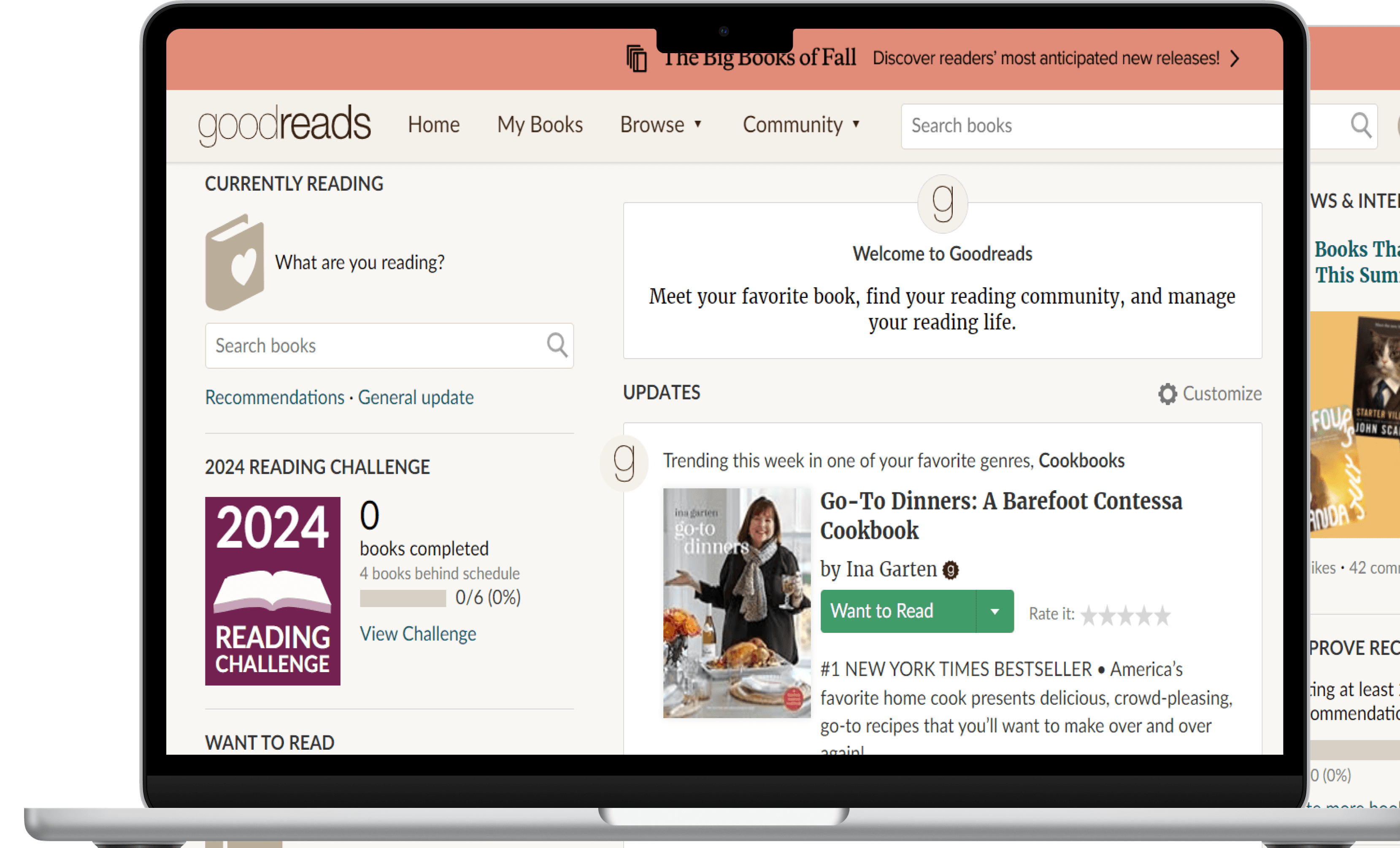
The site suffers from inconsistent visual language, poor icon and button placement, insufficient signifiers, and cluttered layouts, making navigation and task completion unintuitive. Key issues include a lack of clear functionality, limited pathways for tasks, and disruptive design elements like hover-triggered book summaries.
The site suffers from inconsistent visual language, poor icon and button placement, insufficient signifiers, and cluttered layouts, making navigation and task completion unintuitive. Key issues include a lack of clear functionality, limited pathways for tasks, and disruptive design elements like hover-triggered book summaries.
Project Goal
Project Goal
Evaluate the website as a team and interact with users to understand and cross-check the evaluation done by the team.
Using insights gathered from the concept validation, conclude the appropriate corrective measures and arrive at the best alternative proposed by the team.
Evaluate the website as a team and interact with users to understand and cross-check the evaluation done by the team.
Using insights gathered from the concept validation, conclude the appropriate corrective measures and arrive at the best alternative proposed by the team.
Project Details
Project Details

Understanding the problem areas of the website
Understanding the problem areas of the website
To get an idea of what should be tested during the concept walkthrough, we conducted a round of heuristic evaluation. This allowed us to gauge the UI issues that were affecting the UX of the product.
To get an idea of what should be tested during the concept walkthrough, we conducted a round of heuristic evaluation. This allowed us to gauge the UI issues that were affecting the UX of the product.
As a team we focused on 3 flows, each one of us took up one flow to evaluate. We later regrouped to understand the commonalities and differences in each of our evaluations.
As a team we focused on 3 flows, each one of us took up one flow to evaluate. We later regrouped to understand the commonalities and differences in each of our evaluations.
User Persona
User Persona

Tia, 19
Novice Reader
Bio
She is a fresher at a design college and comes across her huge library.
Habits
Playing an instrument
Attend classes on personal development
Going for a walk in the park
Goals:
Wants to start reading books
Wants to explore different genres and authors
Frustrations
She doesn’t know which book to get started with
There is no single platform for her to glance at all the books at once
Motivations
She wants to improve her knowledge and vocabulary
She wants to be part of a community where she can discuss about books and have an opinion
“ I want to have my own personal library in my house”
The user persona was derived by researching the target audience of Goodreads.
These are the stats that shaped the persona:
59.93% are Female users.
21.1% of users are from the 18-24 age group. This the second-highest user category. The first one being 25-34 contributing to 29.44% of the user base.
Primary target audience of the platform is associated with Universities and Colleges.
Task Flow: Participating in a discussion about a book
Task Flow: Participating in a discussion about a book

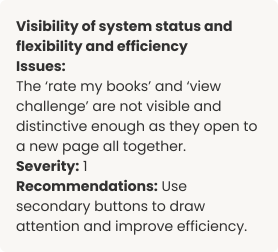
Conducting Heuristic Evaluation for screens in the flow
Conducting Heuristic Evaluation for screens in the flow

Homepage
Homepage


Discussions page
Discussions page
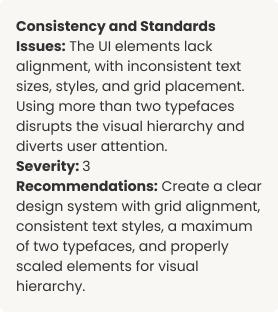

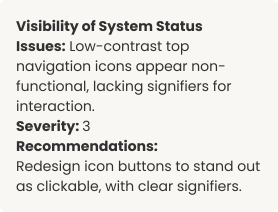

Posting a new discussion
Posting a new discussion
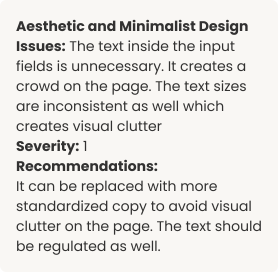

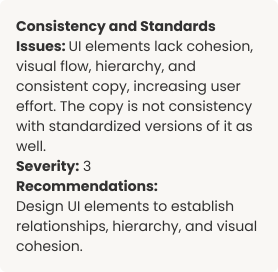

Posted discussion question
Posted discussion question


Summary Report
Summary Report
The summary report highlights key problem areas identified across the three flows our team analyzed. These issues informed the concept flows we designed and tested.
The summary report highlights key problem areas identified across the three flows our team analyzed. These issues informed the concept flows we designed and tested.
01
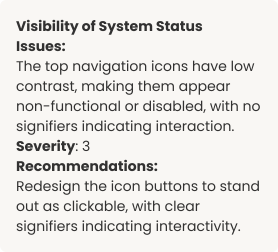
Visibility of System Status
Icons and buttons lack clear functionality and are hard to locate due to poor placement and low visibility.
02
Consistency & Standards
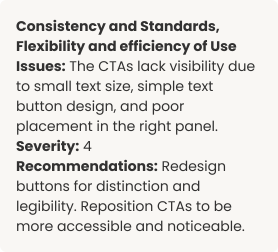
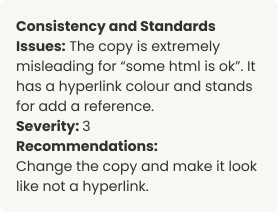
The site lacks consistency in visual language. Button styles vary, with text buttons as primary CTAs and sudden shifts to filled or outlined buttons. Icon buttons appear disabled, and clickable text lacks distinction from hyperlinks. Confirmation banners differ in style and placement across pages.
03
Aesthetic &
Minimalist Design
The homepage is cluttered with distracting information, while the profile editing page has excessive fields that users often overlook, adding unnecessary content.
04
Recognition
rather than Recall
Signifiers are insufficient, with generic icons failing to convey CTA functionality.
05
User Control & Freedom
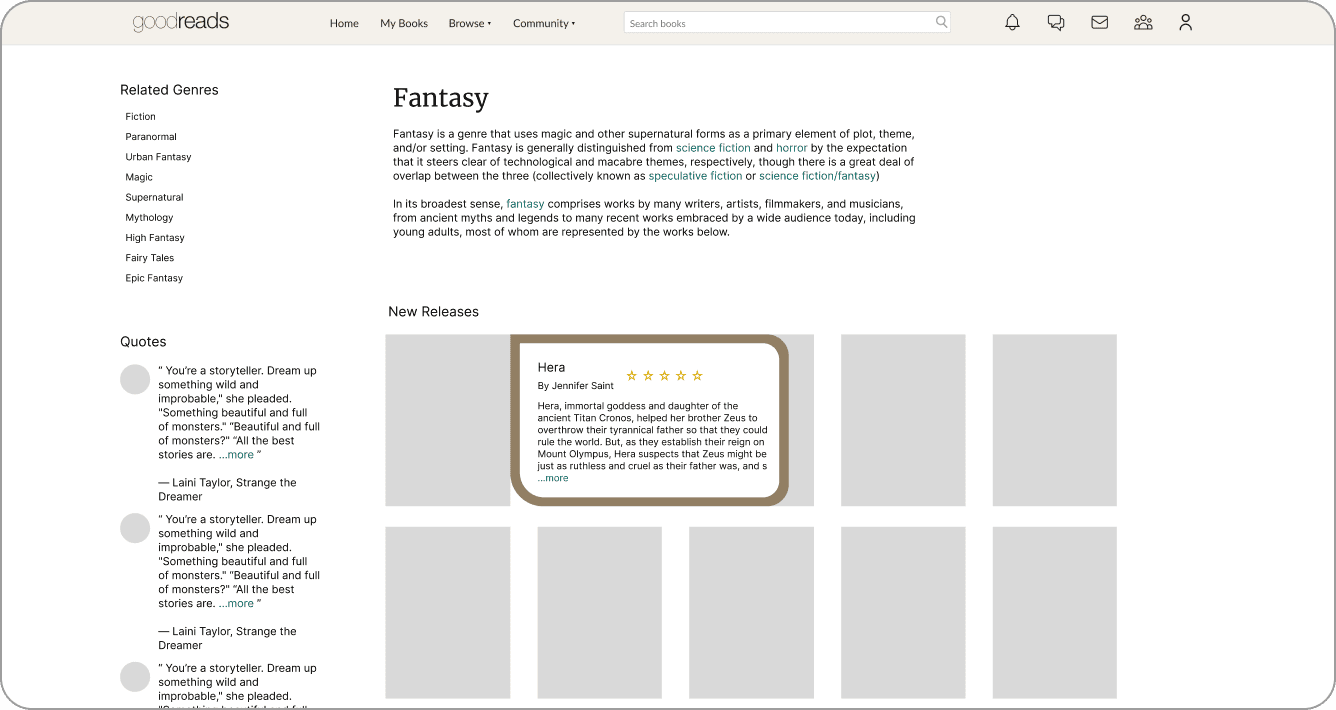
Hovering over books shows summaries that block others, disrupting seamless scrolling and increasing user effort.
06
Flexibility &
Efficiency of Use
There is a lack of intuitive, multiple pathways for the user to take for certain tasks. For example, the user cannot search specific discussion threads and instead can only search for books.
Concept Validation
Concept Validation
Creating concepts for testing
Creating concepts for testing
For concept validation, we concentrated on the following task flows. As a team of three, we separately designed a concept prototype for each flow.
For concept validation, we concentrated on the following task flows. As a team of three, we separately designed a concept prototype for each flow.
My concept prototypes (Denoted as Concept 3 in further documentation)
My concept prototypes (Denoted as Concept 3 in further documentation)
To ensure that the making process was collaborative, we started with iterating paper prototypes. Each of us made 2 iterations for each flow. We later discussed and picked the screens all of us thought worked well from everyone’s iterations.
To ensure that the making process was collaborative, we started with iterating paper prototypes. Each of us made 2 iterations for each flow. We later discussed and picked the screens all of us thought worked well from everyone’s iterations.

A peek into the iteration process
Flow 1: Reading the summary of a book
Flow 1: Reading the summary of a book



Flow 2: Participate in a discussion about a book
Flow 2: Participate in a discussion about a book


Flow 3: Changing display name
Flow 3: Changing display name


Concept Validation Script and Process
Concept Validation Script and Process
To maintain consistency, we followed a prepared script while switching roles for each test. We divided the work into three roles: Moderator, Observer, and Note-taker, ensuring thorough documentation and focus on one task at a time.
To maintain consistency, we followed a prepared script while switching roles for each test. We divided the work into three roles: Moderator, Observer, and Note-taker, ensuring thorough documentation and focus on one task at a time.
Conducting Concept Validation
Conducting Concept Validation
We conducted Concept Validation with a total of 6 users. Given below is a glimpse into the process of 1 user.
We conducted Concept Validation with a total of 6 users. Given below is a glimpse into the process of 1 user.
User 1: Concept Validation
User 1: Concept Validation

My role as a Moderator
My role as a Moderator
As a moderator I ensured that the participants felt comfortable by making some light conversation with them at the start.
Our script was structured in such a way that the participants were eased into the atmosphere of the website as well as the testing. This ensured familiarity with the content from the user’s side.
There were times when the users were unable to formulate reasons for their actions. In such cases, I tried to push them gently by asking probing questions for that particular action. I also reminded them of the context in these cases and to comfort them reiterated on the fact that the product is being tested and not them (the user).
We had asked the participants to use the “think aloud” method while going through the concepts. This was quite helpful as moderator as I understood the user’s active thoughts and steer the conversation accordingly.
As a moderator I ensured that the participants felt comfortable by making some light conversation with them at the start.
Our script was structured in such a way that the participants were eased into the atmosphere of the website as well as the testing. This ensured familiarity with the content from the user’s side.
There were times when the users were unable to formulate reasons for their actions. In such cases, I tried to push them gently by asking probing questions for that particular action. I also reminded them of the context in these cases and to comfort them reiterated on the fact that the product is being tested and not them (the user).
We had asked the participants to use the “think aloud” method while going through the concepts. This was quite helpful as moderator as I understood the user’s active thoughts and steer the conversation accordingly.
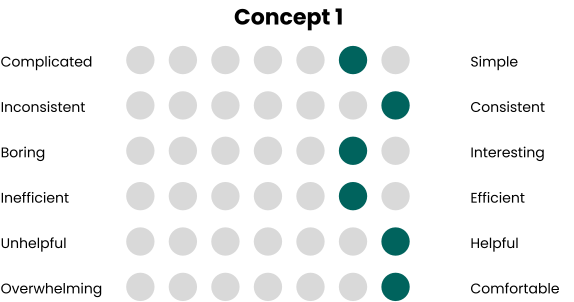
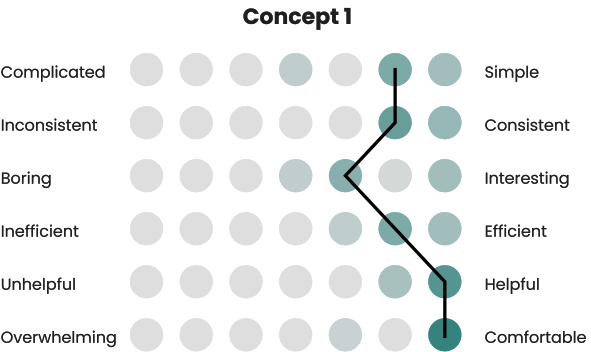
User 1: Semantic Differential Scale
User 1: Semantic Differential Scale


Results and Conclusions
Results and Conclusions
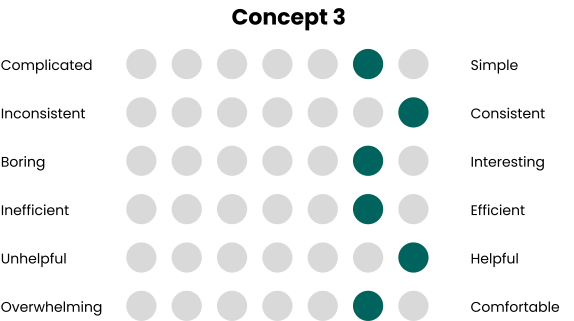
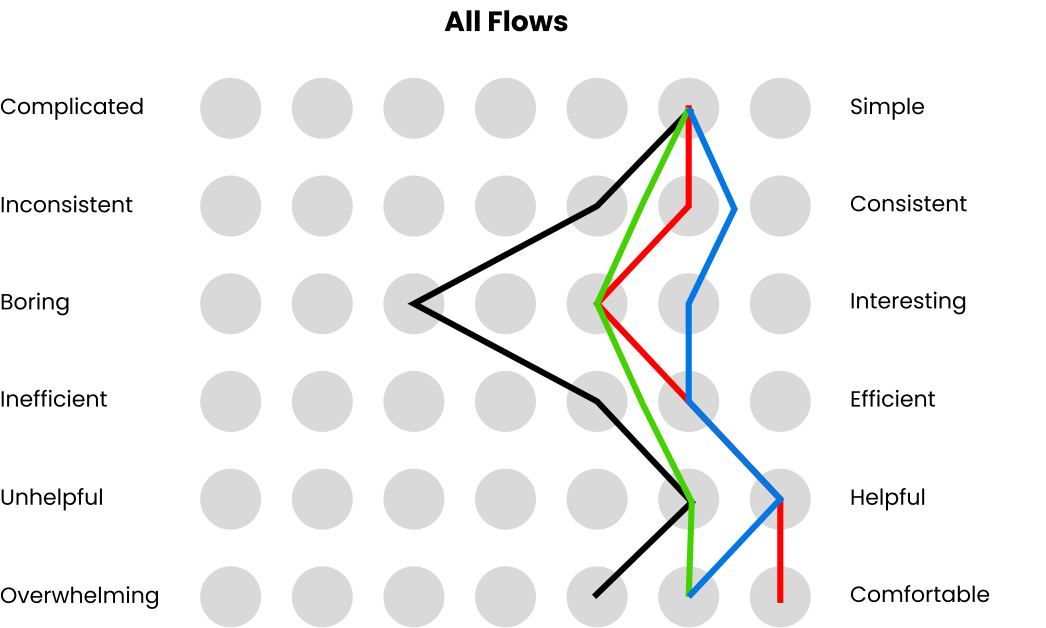
Average Semantic Differential Scale (6 users)
Average Semantic Differential Scale (6 users)



Comparison of Average SDS
Comparison of Average SDS
Original
Original
Concept 1
Concept 1
Concept 2
Concept 2
Concept 3
Concept 3
Insights
Insights
Looking at the SDS Scores calculated from a total of 6 users with varying experience with the product there is a solid leaning towards the concepts proposed over the original flow.
The original product’s usability issues outlined the heuristic evaluation were validated by the feedback the team received from the “Think Aloud” method. A few of them are as follows:
Lack of discoverability for Primary CTAs
Excess visual load for screens with books
Presence of unexpected interactions
Misleading iconography
Lack of signifiers for actions
In all three concepts, we aimed to resolve these issues. Based on the average SDS scores, Concept 3 tended the most to the right. This emphasizes the fact that novice users of Goodreads prefer a website that is extremely consistent in terms of visual language, with interesting interactions and a helpful interface. Users tended to prefer interacting with non-cluttered layouts which still had the familiarity of the grid system of the original website. Users also enjoyed explicit and visible confirmation statuses, and simplified task flows.
Looking at the SDS Scores calculated from a total of 6 users with varying experience with the product there is a solid leaning towards the concepts proposed over the original flow.
The original product’s usability issues outlined the heuristic evaluation were validated by the feedback the team received from the “Think Aloud” method. A few of them are as follows:
Lack of discoverability for Primary CTAs
Excess visual load for screens with books
Presence of unexpected interactions
Misleading iconography
Lack of signifiers for actions
In all three concepts, we aimed to resolve these issues. Based on the average SDS scores, Concept 3 tended the most to the right. This emphasizes the fact that novice users of Goodreads prefer a website that is extremely consistent in terms of visual language, with interesting interactions and a helpful interface. Users tended to prefer interacting with non-cluttered layouts which still had the familiarity of the grid system of the original website. Users also enjoyed explicit and visible confirmation statuses, and simplified task flows.
Reflections
Reflections
The technical learnings I have had from this project are as follows:
It is important to time out the sessions. This helps me as a moderator to take a breather and reduce the biases that could possibly seep through the next sessions. My actions should not affect the user’s behaviour.
It is important to re-arrange the order in which the testing material is presented to the users. This ensures that the feedback given is less biased. Presenting scripts in a fixed order would mean each user has similar level of familiarity with the concept which affects results.
Determine your end goals very specifically at the beginning of the projects. Decide on the metrics one wants to measure, how should one measure it and why. This gives the sessions clarity and the formation of the script is also fueled by a common, precise objective.
Keeping the user comfortable in the environment is extremely important. If the user is uncomfortable in any way, the way they answer questions and respond to the experience changes which results in flawed conclusions.
It is important to remind the user that the team is testing the product and not the user. One must be mindful of the dynamics at play in the setting and should ensure that the user does not feel inferior in the setting.
The technical learnings I have had from this project are as follows:
It is important to time out the sessions. This helps me as a moderator to take a breather and reduce the biases that could possibly seep through the next sessions. My actions should not affect the user’s behaviour.
It is important to re-arrange the order in which the testing material is presented to the users. This ensures that the feedback given is less biased. Presenting scripts in a fixed order would mean each user has similar level of familiarity with the concept which affects results.
Determine your end goals very specifically at the beginning of the projects. Decide on the metrics one wants to measure, how should one measure it and why. This gives the sessions clarity and the formation of the script is also fueled by a common, precise objective.
Keeping the user comfortable in the environment is extremely important. If the user is uncomfortable in any way, the way they answer questions and respond to the experience changes which results in flawed conclusions.
It is important to remind the user that the team is testing the product and not the user. One must be mindful of the dynamics at play in the setting and should ensure that the user does not feel inferior in the setting.




Heuristic Evaluation and Concept Walkthrough
Heuristic Evaluation and Concept Walkthrough
Understanding user issues through heuristic evaluation methods and testing possible solutions through concept walkthroughs of multiple prototypes.
Understanding user issues through heuristic evaluation methods and testing possible solutions through concept walkthroughs of multiple prototypes.
Shravani Agashe
Ananya Krishnan
Anoushka Goel
Shravani Agashe
Ananya Krishnan
Anoushka Goel